Branded Experience
The Zing branded experience is enabled through deep links that route users from a partner’s app or website to a Zing-hosted partner-specific onboarding website or Zing mobile application. Zing renders partner-specific UI, and applies the appropriate content, pricing and coach behaviour. This model requires no mobile development from the partner and inherits all new Zing features automatically.
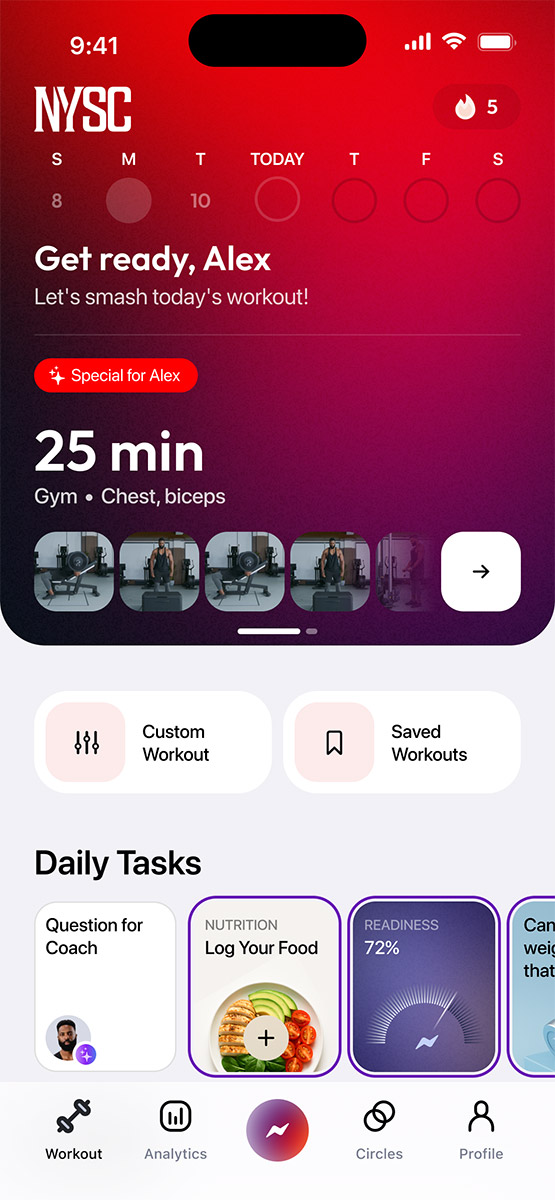
Deep-Link Flow
Partners integrate by exposing a link inside their mobile app, website or CRM. When a user follows the link:
- Zing resolves the partner ID embedded in the link.
- Zing loads the partner’s configuration profile (branding, coach settings, content).
- The user is redirected to:
- a Zing-hosted onboarding website if they are new, or
- the Zing mobile application, preloaded with the partner-specific experience.
If the Zing app is not installed, the user is routed through an install–open flow with partner context preserved.
Illustrative deep link:
https://zing.coach/partner/onboard?p=<partner_id>&s=<signature>&u=<external_user_id?>partner_ididentifies the configuration profile.signatureprotects the link from tampering.external_user_id(optional) allows the partner to associate internal user identities with Zing accounts.
Partner Customisation Options
Partner UI and behaviour customisation is done by Zing during Partner onboarding, and can be adjusted any time by raising a request through your partner manager.
Supported configuration parameters:
- Brand identity: logo, colours, typography, icons, spacing.
- UI elements: button styling, layout variants.
- Location integrations: gym or studio metadata for local recommendations and tailored workout plans (eg, using only the equipment available at the gym).
- Coach behaviour: look, persona traits, tone, guidance style, knowledge base.
- Exercise and media overrides: partner-specific exercises, video/audio assets and replacement content.
- Feature flags: enable or disable features per partner where required.
- Pricing rules: controlled per commercial agreement.
The depth of customisation is determined by the commercial agreement between the partner and Zing.
Responsibilities
Partner Responsibilities:
- Marketing and advertising for the branded experience.
- Provide branding assets and configuration inputs.
- Provive knowledge base for the coach: brand information, product features, FAQs, etc.
- Ensure consistency of user expectations in partner-owned surfaces.
Zing Responsibilities:
- Host and maintain the onboarding funnel and mobile app.
- Apply partner configuration and enforce isolation.
- Manage updates, feature rollouts, AI behaviour, and CV modules.
- Provide monitoring and error visibility for the partner-specific flows.
- Customer support for end users.